PM9G45: Difference between revisions
Change link for the system requirements |
Update Buildroot instructions for br2-external-ronetix / linux4microchip-2026.04 |
||
| Line 49: | Line 49: | ||
|- | |- | ||
| style="padding: 5px;"| binaries/at91bootstrap.bin | | style="padding: 5px;"| binaries/at91bootstrap.bin | ||
| style="padding: 5px;"| BIN image, should be programmed at address 0x0 | | style="padding: 5px;"| BIN image, should be programmed at address 0x0 | ||
|- | |- | ||
| style="padding: 5px;"| binaries/at91bootstrap.elf | | style="padding: 5px;"| binaries/at91bootstrap.elf | ||
| Line 71: | Line 71: | ||
==== Prerequisites ==== | ==== Prerequisites ==== | ||
The host build system should be a Linux system with necessary software installed: | The host build system should be a Linux system with necessary software installed: | ||
http://www.buildroot.net/downloads/manual/manual.html#requirement<br> | http://www.buildroot.net/downloads/manual/manual.html#requirement<br> | ||
In addition to these required packages, you should also install libssl-dev: | In addition to these required packages, you should also install libssl-dev: | ||
$ sudo apt-get install libssl1.0-dev | $ sudo apt-get install libssl1.0-dev | ||
or, depending on your host distribution: | or, depending on your host distribution: | ||
$ sudo apt-get install libssl-dev | $ sudo apt-get install libssl-dev | ||
==== Get sources ==== | ==== Get sources ==== | ||
$ git clone https://github.com/ | $ mkdir buildroot-ronetix | ||
$ cd buildroot-ronetix | |||
$ git clone https://github.com/linux4microchip/buildroot-mchp.git | |||
$ git clone https://github.com/ronetix/br2-external-ronetix.git | |||
$ cd buildroot-mchp | $ cd buildroot-mchp | ||
$ git | $ git switch -c linux4microchip-2026.04 linux4microchip-2026.04 | ||
==== Build ==== | ==== Build ==== | ||
$ make pm9g45_defconfig | $ make BR2_EXTERNAL=../br2-external-ronetix pm9g45_defconfig | ||
$ make | $ make | ||
==== Build Results ==== | ==== Build Results ==== | ||
Once compilation is done, the images have been generated in: ./output/image:<br> | Once compilation is done, the images have been generated in: ./output/image:<br> | ||
* at91bootstrap.bin | * at91bootstrap.bin | ||
* rootfs.tar | * rootfs.tar | ||
* u-boot.bin | * u-boot.bin | ||
* zImage | * zImage | ||
* pm9g45.dtb | * pm9g45.dtb | ||
* rootfs.ubi | * rootfs.ubi | ||
* rootfs.ubifs | * rootfs.ubifs | ||
| Line 126: | Line 129: | ||
| style="padding: 5px;"| 0x00020000 | | style="padding: 5px;"| 0x00020000 | ||
| style="padding: 5px;"| u-boot.bin | | style="padding: 5px;"| u-boot.bin | ||
| style="padding: 5px;"| U-BOOT, third level bootloader | | style="padding: 5px;"| U-BOOT, third level bootloader | ||
|- | |- | ||
| style="padding: 5px;"| 0x00180000 | | style="padding: 5px;"| 0x00180000 | ||
Latest revision as of 14:32, 15 September 2026
|
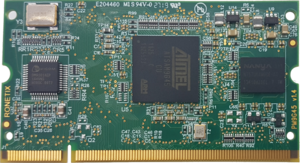
PM9G45 is a System-on-module (SoM) board in SODIMM204 format designed for embedded applications. PM9G45 is using the Microchip (ATMEL) AT91SAM9G45 CPU with an ARM926EJ CPU running at 400MHz Product Info: https://ronetix.at/product/pm9g45-cpu-module-with-atmel-at91sam9g45
Information about at91bootstrap, U-BOOT, Linux can be found here: |
 |
Building at91bootstrap - second level bootloader for PM9G45
This bootloader is based on https://github.com/linux4sam/at91bootstrap, branch at91bootstrap-3.x
Install and setup the cross-compiler and CPU architecture
$ cd ~
$ mkdir bin
$ wget http://download.ronetix.at/toolchains/crosstool-ng/arm-ronetix-eabi-11.1.0.tar.gz
$ tar xvfz arm-ronetix-eabi-11.1.0.tar.gz --directory bin
$ export ARCH=arm
$ export CROSS_COMPILE=~/bin/arm-ronetix-eabi-11.1.0/bin/arm-ronetix-eabi-
Clone the latest revision of the repo
$ git clone [email protected]:ronetix/at91bootstrap.git -b at91bootstrap-3.10.4_rnx
$ cd at91bootstrap
Configure and build for booting of U-BOOT
$ make pm9g45_nf_uboot_defconfig
$ make
Configure and build for booting of Linux Kernel
$ make pm9g45_nf_linux_defconfig
$ make
Build Results
| File Name | Description |
|---|---|
| binaries/at91bootstrap.bin | BIN image, should be programmed at address 0x0 |
| binaries/at91bootstrap.elf | ELF image used for JTAG debugging |
Building Buildroot - a simple Linux System for PM9G45
Buildroot is a simple, efficient and easy-to-use tool to generate embedded Linux systems through cross-compilation.
The home page of Buildroot is: https://buildroot.org
The Buildroot user manual can help you better understand how Buildroot works: http://www.buildroot.net/downloads/manual/manual.html
The Buildroot for AT91SAM9G45 is maintained by Microchip: https://github.com/linux4microchip/buildroot-mchp
Buildroot can build:
- at91bootstrap
- U-Boot
- Linux kernel
- A cross-compiler
- Root filesystems of different types
Prerequisites
The host build system should be a Linux system with necessary software installed:
http://www.buildroot.net/downloads/manual/manual.html#requirement
In addition to these required packages, you should also install libssl-dev:
$ sudo apt-get install libssl1.0-dev
or, depending on your host distribution:
$ sudo apt-get install libssl-dev
Get sources
$ mkdir buildroot-ronetix
$ cd buildroot-ronetix
$ git clone https://github.com/linux4microchip/buildroot-mchp.git
$ git clone https://github.com/ronetix/br2-external-ronetix.git
$ cd buildroot-mchp
$ git switch -c linux4microchip-2026.04 linux4microchip-2026.04
Build
$ make BR2_EXTERNAL=../br2-external-ronetix pm9g45_defconfig
$ make
Build Results
Once compilation is done, the images have been generated in: ./output/image:
- at91bootstrap.bin
- rootfs.tar
- u-boot.bin
- zImage
- pm9g45.dtb
- rootfs.ubi
- rootfs.ubifs
Customizing Buildroot
AT91Bootstrap
$ make at91bootstrap3-menuconfig
U-BOOT
$ make uboot-menuconfig
Linux Kernel
$ make linux-menuconfig
RootFs
$ make menuconfig
NAND Boot: Programming images
SAM-BA tool or PEEDI JTAG Flash Programmer can be used for programming the images into the NAND Flash.
| Address | Image | Note |
|---|---|---|
| 0x00000000 | boot.bin | at91bootstrap |
| 0x00020000 | u-boot.bin | U-BOOT, third level bootloader |
| 0x00180000 | pm9g45.dtb | Device tree for Linux Kernel |
| 0x00200000 | zImage | Linux Kernel |
| 0x00800000 | rootfs.ubi | Root file system |